Key tips for integrating Odoo with WooCommerce

Do you need to integrate Odoo with WooCommerce?
If you work with different software programs, you may need to follow this process at any time. The integration between Odoo, one of the most comprehensive ERPs on the market, and WooCommerce, one of the most widely used e-commerce platforms in Spain, represents a strategic solution. This combination allows online businesses to unify their sales, accounting, logistics, and inventory management, reducing errors and increasing efficiency.
At Dynapps, since we are Odoo Gold Partner We often receive this request from companies. In this article, learn why this integration is necessary, the available methods, steps, and recommendations for Integrate Odoo with WooCommerce.
Why integrate Odoo with WooCommerce?
The union of Odoo and WooCommerce opens up a wide range of possibilities for optimizing the management of your online store. This not only makes data management easier, but also transforms the way the business is managed and operated.
Process automation
Order and process automation is one of the main reasons to integrate Odoo with WooCommerce. When connected, Repetitive manual tasks are eliminated such as inventory updates and order processing. The entire workflow—from order receipt to invoicing and logistics—is managed automatically.
This integration drastically reduces potential human error, improves efficiency, and frees up time to focus on strategic activities. In addition, allows for greater scalability, since the company can expand its operations without having to proportionally increase its administrative resources.
Real-time data synchronization
One of the challenges faced by those who work in a traditional manner is accessing critical data in real time. The integration between Odoo and WooCommerce enables real-time synchronization of critical data such as inventory, sales, revenue, and returns.
This ensures that decisions are made based on up-to-date and reliable information, thereby avoiding issues that could affect the customer experience and logistics. Information centralized in a A comprehensive ERP system like Odoo becomes the backbone of robust and adaptive business strategies.
Improved decision-making
One of the custom integration solutions is have accurate and up-to-date data. The integration provides easy access to detailed reports, trend analyses, and key metrics, enabling decisions based on facts and real data.
Thus, marketing strategies are optimized, product inventory is adjusted based on demand, and more impactful marketing campaigns are planned. In a competitive environment, the ability to anticipate trends in real time can make the difference between success and missed opportunities.
You may also be interested in: Odoo and Shopify.
Methods for integrating Odoo with WooCommerce
There are various Options for integrating Odoo and WooCommerce, each with its own advantages and unique features. The choice will depend on the size of the business, the budget, and the level of customization required.
Use of official connectors
The official connectors These tools have been developed and validated by both Odoo and WooCommerce providers, ensuring high compatibility and stability. These solutions offer ready-to-use integrations, along with technical support and ongoing updates.
In this case, Implementation is usually simpler and faster, allowing businesses to start reaping the benefits of data synchronization in a short period of time. The security and reliability they offer are essential for preventing disruptions in operational management.
API Integration
APIs (Application Programming Interfaces) provide a flexible way to connect each business's custom systems. Integration using this method allows for extensive customization and configuration of the connection to the specific needs of the operation.
Although it may require more technical expertise or the support of a development team, it offers the advantage of create customized solutions that maximize the potential of both platforms. This option also facilitates integration with other systems and applications, creating a comprehensive and adaptable digital network.
Customized solutions
Every company is unique, and sometimes it is necessary to develop an integration solution that is fully tailored to its internal processes. Custom integrations allow you to configure every aspect of the Integration between Odoo and WooCommerce, from the data structure to the synchronization frequency.
Although this method requires a greater investment of time and resources, the result is a solution that meets the specific needs of the business. In this case, the expertise of a specialized partner, such as Dynapps...it is important to design and implement a comprehensive and scalable solution.
Steps for Successful Integration
Integrating Odoo with WooCommerce is like Integrate WhatsApp with Odoo... is a process that requires time and planning. Therefore, when making the connection, it is necessary to establish various criteria to facilitate the procedure.
Needs Assessment
The first step is to conduct a thorough assessment of the business's current needs and processes. It is essential to identify which areas require automation and which critical points could benefit from integration.
A detailed analysis helps determine everything from the required level of synchronization to the type of priority data. This assessment phase allows for the definition of clear objectives and the establishment of expectations regarding operational efficiency and return on investment.
Choosing the Right Tool
Once the needs have been identified, the next step is choose the integration tool or method that best suits the business environment. It is necessary to compare the feasibility of using official connectors, API integrations, or custom solutions. The choice should be based on factors such as scalability, cost, support, and security offered by each option.
It is important to note that Odoo, the most comprehensive ERP, offers a robust infrastructure to support any type of integration. If you need to review Odoo modules and integrations, contact the experts at Dynapps for the guidance you need.
Setup and Testing
With the tool selected, The integration system is now being configured. This stage involves configuring both systems—Odoo and WooCommerce—so they can exchange information efficiently and without errors. Next, we proceed with installing the connector/API, configuring permissions and access, mapping fields and tables, and performing the initial data synchronization.
It is essential to conduct thorough testing in controlled environments before proceeding with the live deployment. This testing will allow verify that the data is synchronized correctly, identify potential issues, and make any necessary adjustments to ensure optimal performance and avoid surprises.

Team Building
Successful technology integration goes beyond the technical aspects; it requires the team to be prepared to manage and make the most of the new tools. It is essential to train employees on how to use the new features of the ERP system, as well as in the interpretation and analysis of the data exchanged between Odoo and WooCommerce.
Proper training not only makes it easier to adapt to change...but it also maximizes the return on investment. In other words, it ensures that all users understand how to get the most out of the integration.
Recommendations for optimizing integration
After getting to know What is Odoo? and how it integrates with systems like WooCommerce, it is necessary to implement measures that optimize the integration. There are recommendations and best practices that ensure the program continues to deliver benefits.
Regular maintenance
Both Both WooCommerce and Odoo are constantly updated. It is important to keep all systems and connectors up to date to avoid compatibility issues and take advantage of new features. It is recommended to regular inspections to update connectors, apply patches, and adjust settings in line with business developments.
Preventive maintenance ensures a uninterrupted operation. In addition, continuous monitoring of system integrity helps identify opportunities for improvements and optimizations that lead to greater operational efficiency.
Performance monitoring
Another way to optimize the integration of Odoo with WooCommerce is by monitoring performance. You can use tools to verify that the data is syncing properly, without delays or errors. These may include: error alerts, synchronization logs, and activity reports.
For example, the custom analytics tools and dashboards in Odoo They provide details on synchronization speed, data quality, and the identification of obstacles in the process. Monitoring allows for immediate action in the event of any anomaly and protects the store in the event of an unforeseen circumstance.
Technical Support
Have A specialized technical support team is key to resolving any issues that may arise during or after the integration. Responsive, expert support ensures that any issues are resolved quickly, minimizing downtime and ensuring business continuity.
If you need to successfully integrate the system, Dynapps offers an implementation service that includes ongoing support and guidance. We're here to answer any questions you may have.
Conclusion
Integrating Odoo with WooCommerce presents an extraordinary opportunity to transform the management of online stores. Features such as process automation, real-time synchronization, and improved decision-making demonstrate that the benefits are numerous and tangible. The methods for implementing the integration depend on the type of solution you’re looking for, and training is the best way to ensure you reap the long-term benefits of the integration.
ERP-eCommerce integration is a strategy for improving business productivity.
Using the Odoo WooCommerce connector or the Odoo WooCommerce API ensures security and is essential for preventing disruptions in operational management.
To ensure a successful integration, it is necessary to establish expectations regarding both operational efficiency and return on investment.
Good planning is key to successful integration.
Discover what Odoo can do for your business.
An initial meeting to see if we're a good fit, followed by a demonstration tailored to your processes.
More posts like this

4-minute read
Odoo and PHP: Why Critical PHP Vulnerabilities Don't Affect Your Odoo.
Odoo does not run on PHP. The two critical vulnerabilities that PHP fixed on October 21, 2026, put millions of websites at risk—but not your Odoo. We'll explain what happened and what you need to check.

5 min read
AI in Odoo for SMEs: what already works, with real cases.
What AI can do in your Odoo today, the Prima Protección case, the two ways to connect it (Claude via MCP and the Odoo 20 agents) and how to start in your company.
7 min read
Connecting Claude to Odoo: the MCP connector we use every day.
What MCP is, how we connect Claude to your Odoo with our own connector, what your team can do with it from day one, and how it fits with the MCP in Odoo 20.
12 min read
What's new in AI in Odoo 20: agents that act and ask permission.
A summary of the AI talk at Odoo Experience 2026: the Odoo AI agent, app-specific agents, self-update, IAP credits and Odoo as an MCP server, plus what we found in the version 20 code.

Odoo Pricing in Spain
Odoo Pricing in Spain
Licenses, implementation, and how to finance it.

Odoo Partners Near You: Valencia · Murcia · Alicante · Barcelona · Madrid
Odoo Partners Near You: Valencia · Murcia · Alicante · Barcelona · Madrid
Odoo Implementation, Consulting, and Support for Companies in Spain
8-minute read
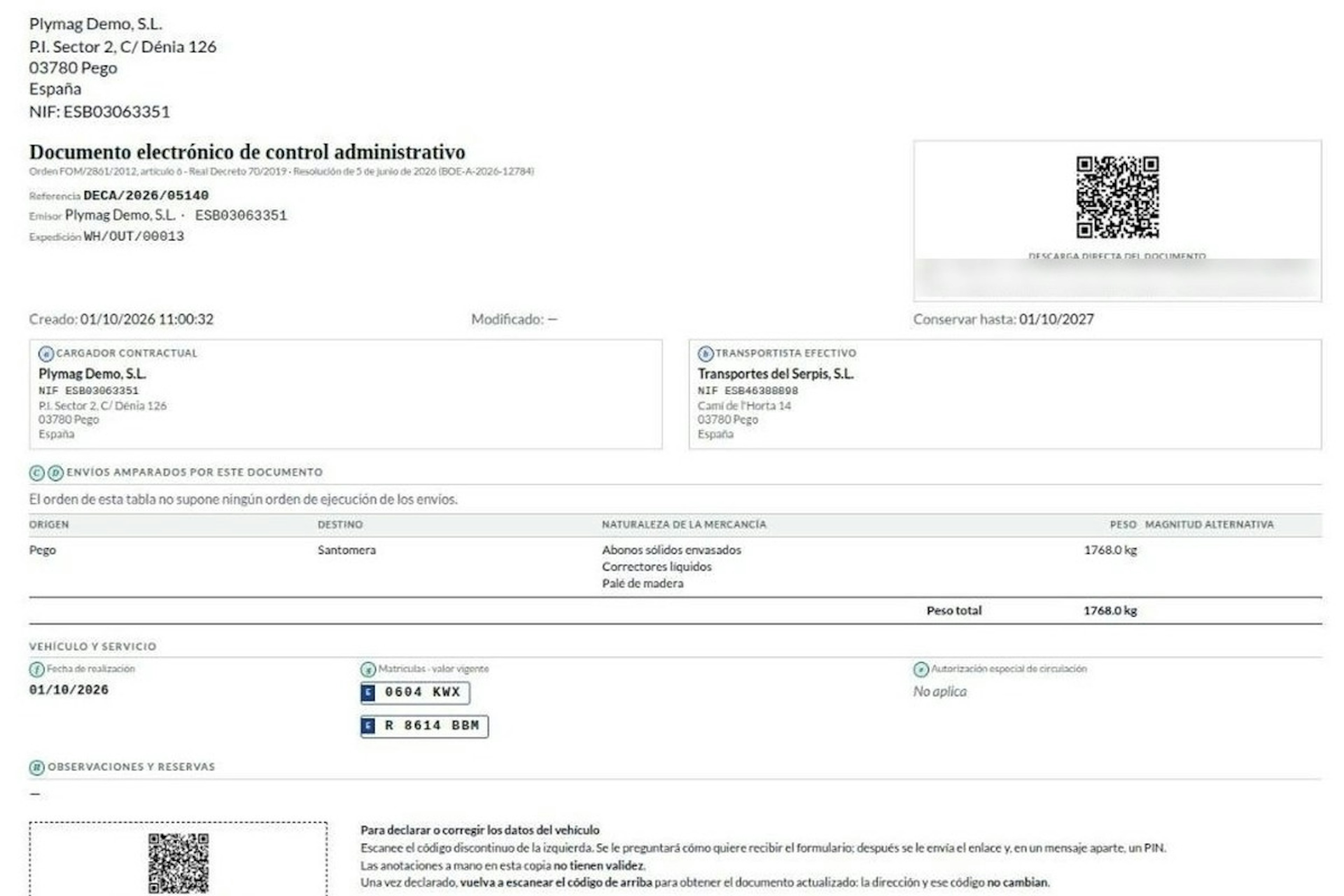
How the DeCA works in Odoo when the truck changes on the road: QR, secure link and PIN.
A breakdown, a different semi-trailer, a reservation about the load: this is how the DeCA is amended in Odoo during transport, with two QR codes, a link only the carrier receives and a six-digit PIN.
8-minute read
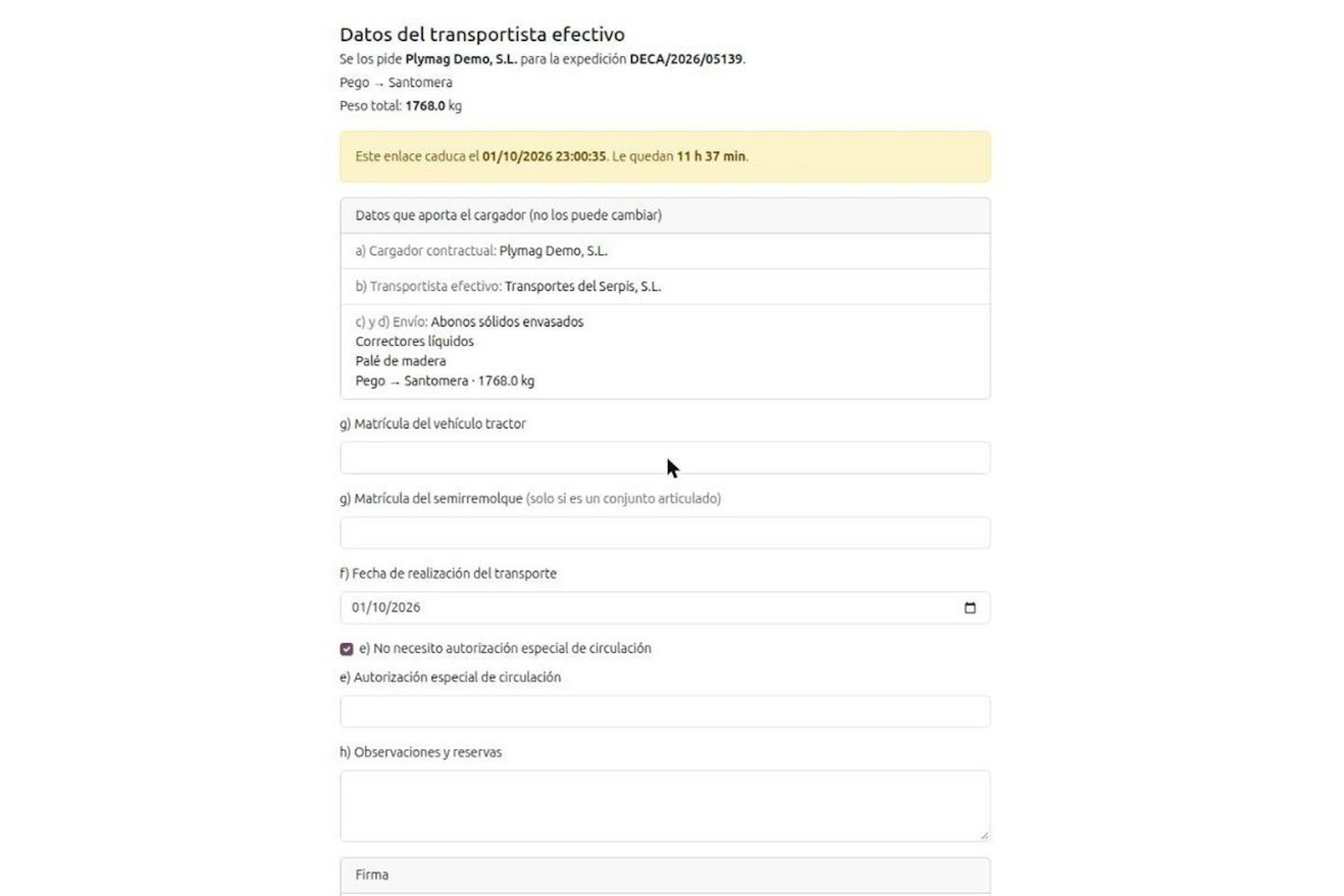
DeCA for transport companies with Odoo: you supply your data by link and issue it when you subcontract.
As the actual carrier, the DeCA binds you, but you will usually supply the special authorisation, date and plates through the link your client's Odoo sends you. When you subcontract, you will normally issue it from your own Odoo.
13-minute read
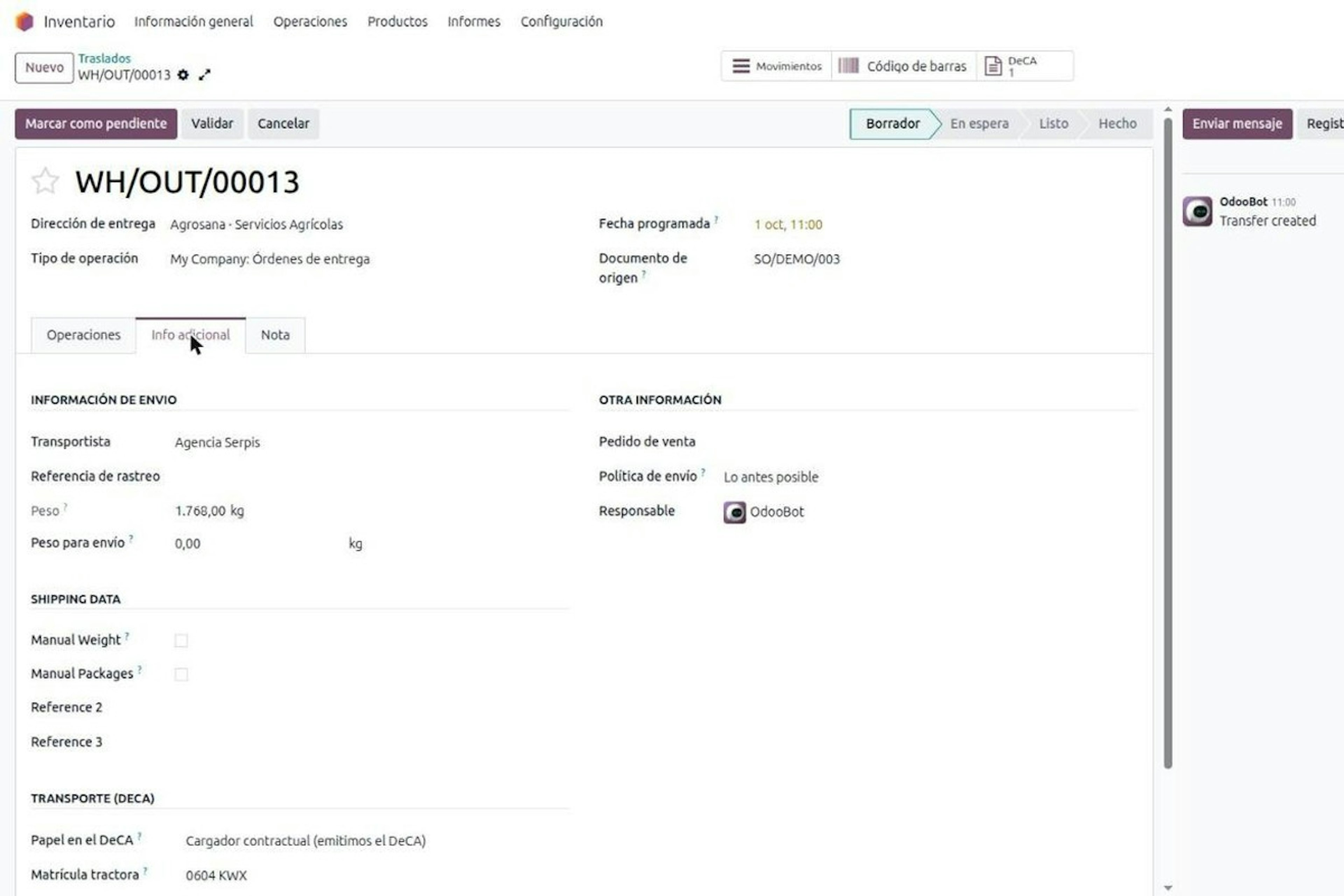
DeCA in Odoo: the transport control document, issued from the delivery order.
The DeCA is mandatory from 5 October 2026. If you run Odoo, you issue it from the delivery order with no separate tool, and the carrier adds the plate from their phone.
8-minute read
DeCA in Odoo for distribution companies: comply even without trucks.
If you distribute with Odoo and contract the transport, the DeCA binds you even if you own no truck, and you will usually be the one issuing it. What data you supply, why it is already on your delivery order and what daily work looks like.