DeCA in Odoo: the transport control document, issued from the delivery order.
The DeCA is mandatory from 5 October 2026. If you run Odoo, you issue it from the delivery order with no separate tool, and the carrier adds the plate from their phone.
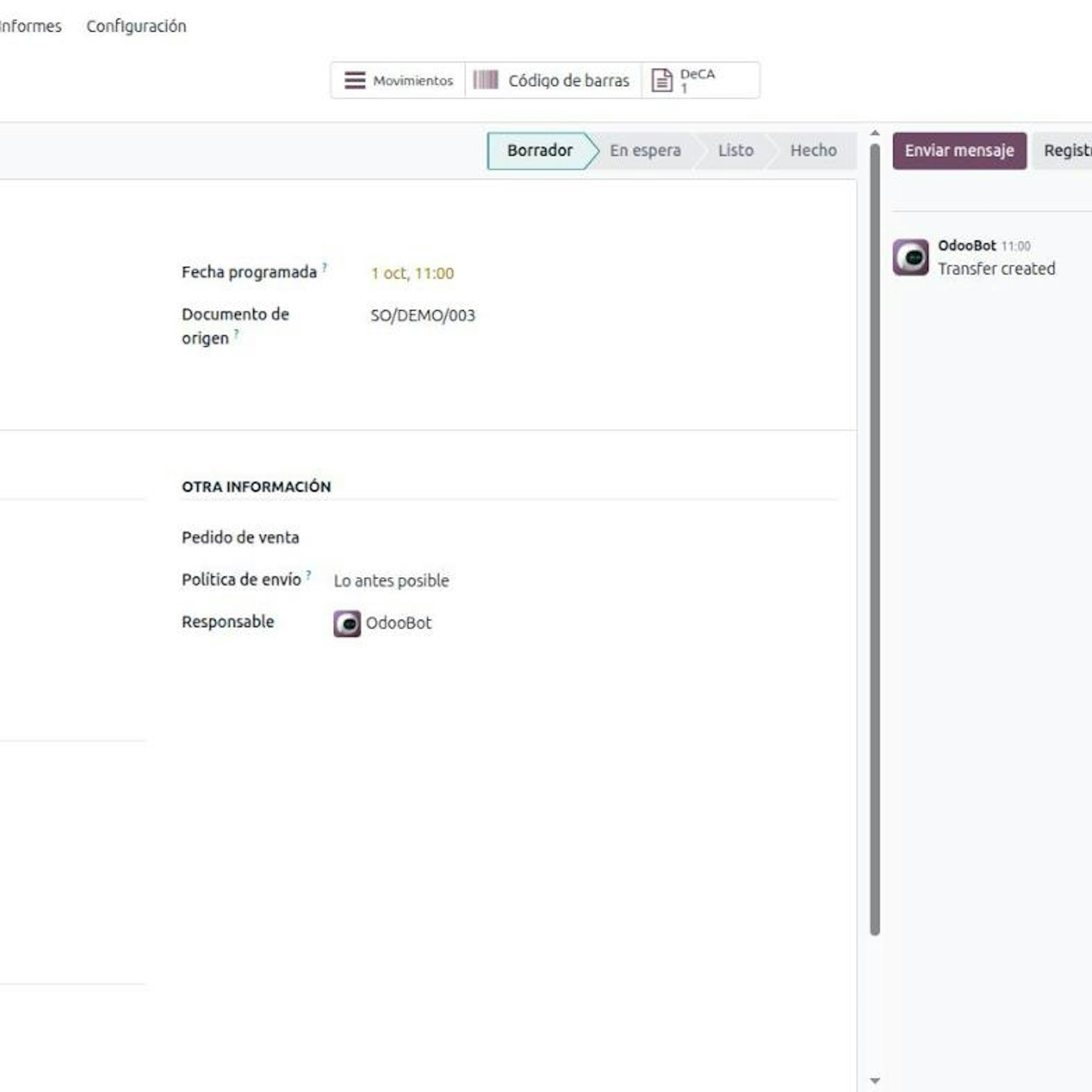
From 5 October 2026, every truck moving goods by road inside Spain must carry a digital control document. If your company already runs Odoo or is about to implement it, the most direct way to comply is the DeCA in Odoo: the document is issued inside Odoo, from the same delivery order you already prepare, with no separate tool. The carrier fills in their part from a phone without logging into your Odoo.
This is not a standalone DeCA program: it is a feature of your Odoo inventory.
What the DeCA is and when it became mandatory.
The DeCA (Documento electrónico de Control Administrativo, or electronic administrative control document) is the digital version of the control document that Order FOM/2861/2012 requires for public road freight with origin and destination in Spain, cabotage included. From 5 October 2026 it must be digital, with no grace period, according to the Ministry of Transport and Sustainable Mobility.
The Resolution of 5 June 2026 (BOE-A-2026-12784) sets out what it must look like:
A native PDF of 5 MB at most, not a scan.
A QR code with a unique URL starting with
https://, served over TLS 1.2 or higher, that downloads the PDF without credentials during the service.Retention for at least one year.
So the DeCA is not a report you print and forget: it is a record that lives from before departure until a year after.
Who has to issue the DeCA.
Order FOM/2861/2012 binds two companies at once: the cargador contractual (contractual shipper), whoever pays a third party to carry their goods, and the transportista efectivo (actual carrier), who provides the truck. The rule does not say which of the two physically generates the document. The usual practice, and the flow we set up in Odoo, is that the contractual shipper issues it: it already holds four of the eight data items and, if it can prove it issued the document, article 7.1 relieves it of answering for the copy being on board. The actual carrier supplies items e, f and g, which only they know, and carries the copy.
The surprise is that distributors, manufacturers, cooperatives and logistics operators without a single truck are contractual shippers. The quick test is who pays the transport invoice? If you do, the DeCA binds you too, and it will normally come out of your Odoo.
The full decision tree is in who must issue the DeCA. If you are a distributor, read the DeCA for distribution companies; if you are a haulier, the DeCA for transport companies using Odoo.
The eight DeCA data items and who answers for each.
Article 6 of Order FOM/2861/2012 sets eight items:
a · Content: Name, tax ID (NIF) and address of the contractual shipper · Answered by: Contractual shipper
b · Content: Name and tax ID of the actual carrier · Answered by: Contractual shipper
c · Content: Place of origin and destination of the shipment · Answered by: Contractual shipper
d · Content: Nature and weight of the goods · Answered by: Contractual shipper
e · Content: Special driving authorisation, where applicable · Answered by: Actual carrier
f · Content: Date the transport is carried out · Answered by: Actual carrier
g · Content: Plates of the tractor and the semi-trailer · Answered by: Actual carrier
h · Content: Remarks and reservations · Answered by: Either party
Two details often go wrong. Both parties must appear expressly and separately: a document with a single customer on it is not enough. And the nature (item d) is the class of goods, not the commercial reference.
Look at the split: items a, b, c and d are already on your Odoo delivery order. Items e, f and g are known to the carrier, who has no user in your system. That is the real DeCA challenge.
Why issue the DeCA from Odoo rather than in a separate tool.
Standard Odoo does not include the DeCA. The temptation is to buy an external app and retype every shipment into it. That cost is invisible on day one; it shows up when you have twenty departures a day and each one means copying shipper, destination, nature and weight into another screen.
Issuing it inside Odoo has three concrete advantages:
The delivery order is the data source. Delivery address, carrier from the shipping method, weight and products are already on the shipment.
No departure slips through. If the delivery order is a contractual-shipper one, Odoo will not let you validate it without the DeCA.
One history. The document, its amendments and the links sent hang off the shipment, with a history that cannot be deleted and kept separate per company if you run multi-company.
How to issue the DeCA in Odoo, step by step.
Step 1. The DeCA role is set on the delivery order.
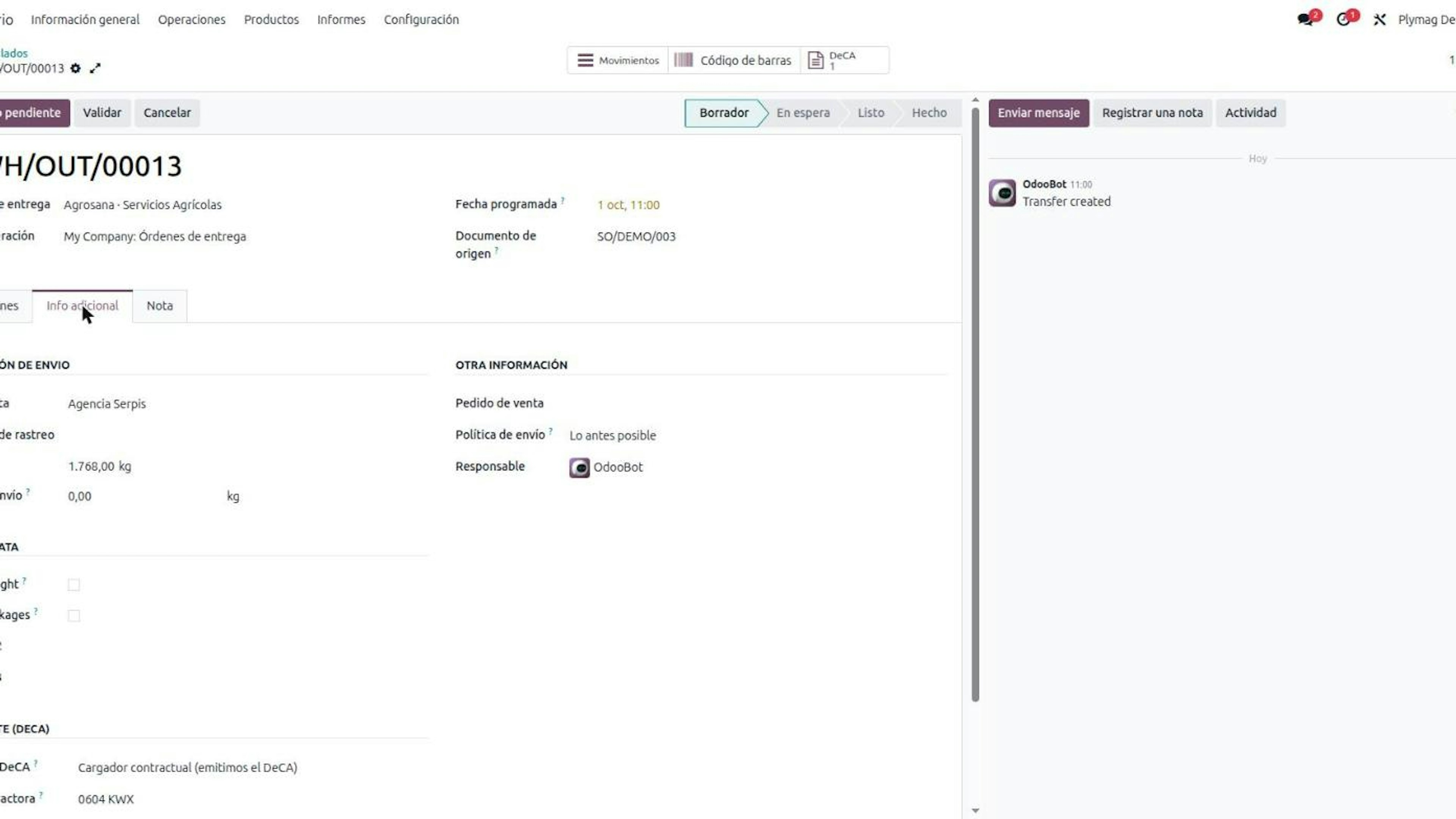
In the additional info of the delivery order you will find the Transport (DeCA) section with the Role in the DeCA field and three values: contractual shipper (you issue it), exempt (shipment covered by article 2.1) and actual carrier.
It is decided per delivery order, not per operation type, because the exemption depends on the specific load.
Step 2. Validating the delivery order requires the DeCA.
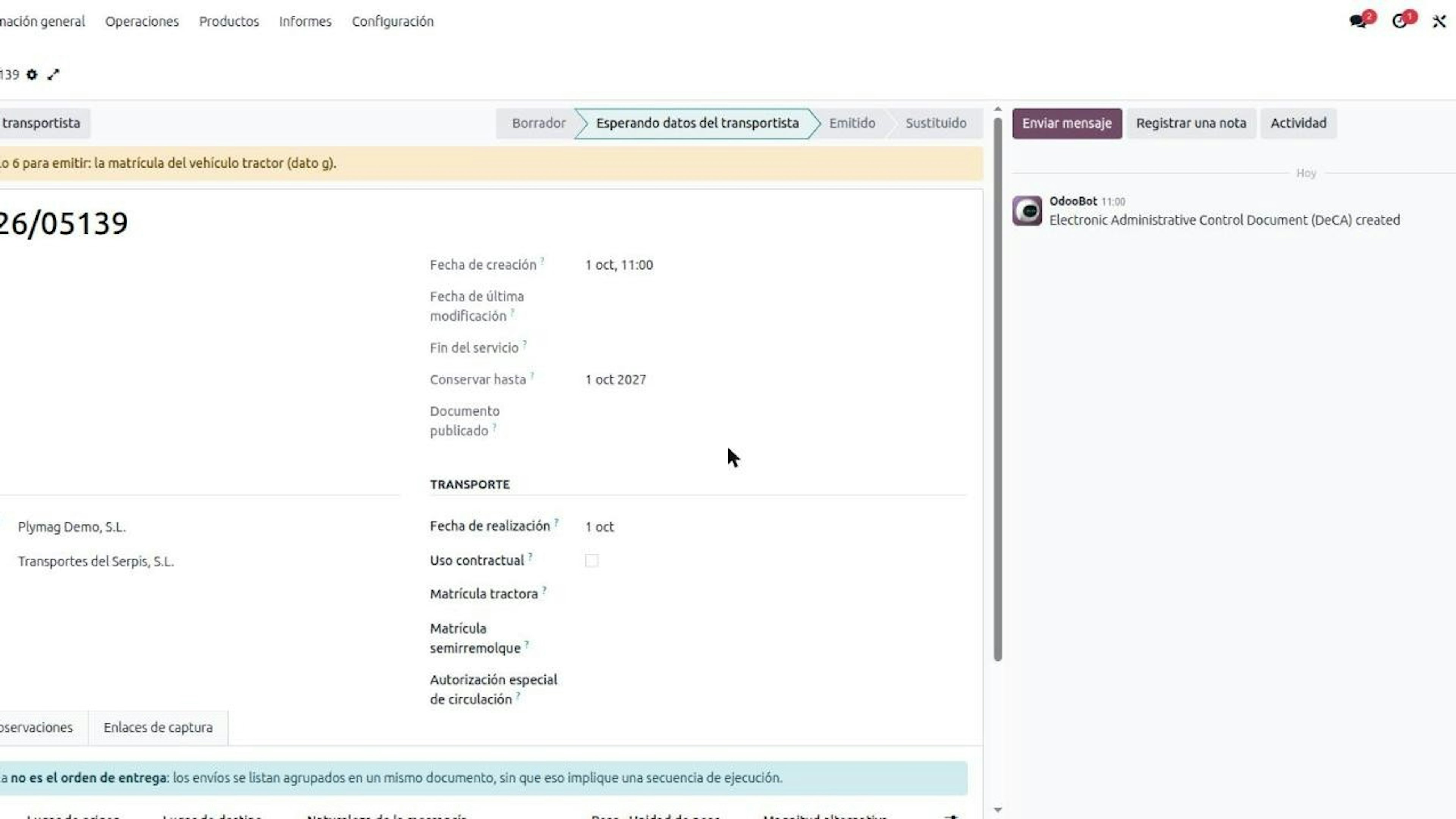
With the contractual-shipper role, validating the delivery order requires the DeCA. Odoo creates the record and copies shipper, actual carrier, origin, destination, nature and weight.
If something only the carrier knows is missing, such as the plate, the document stays in Waiting for carrier data and tells you which article 6 item is missing.
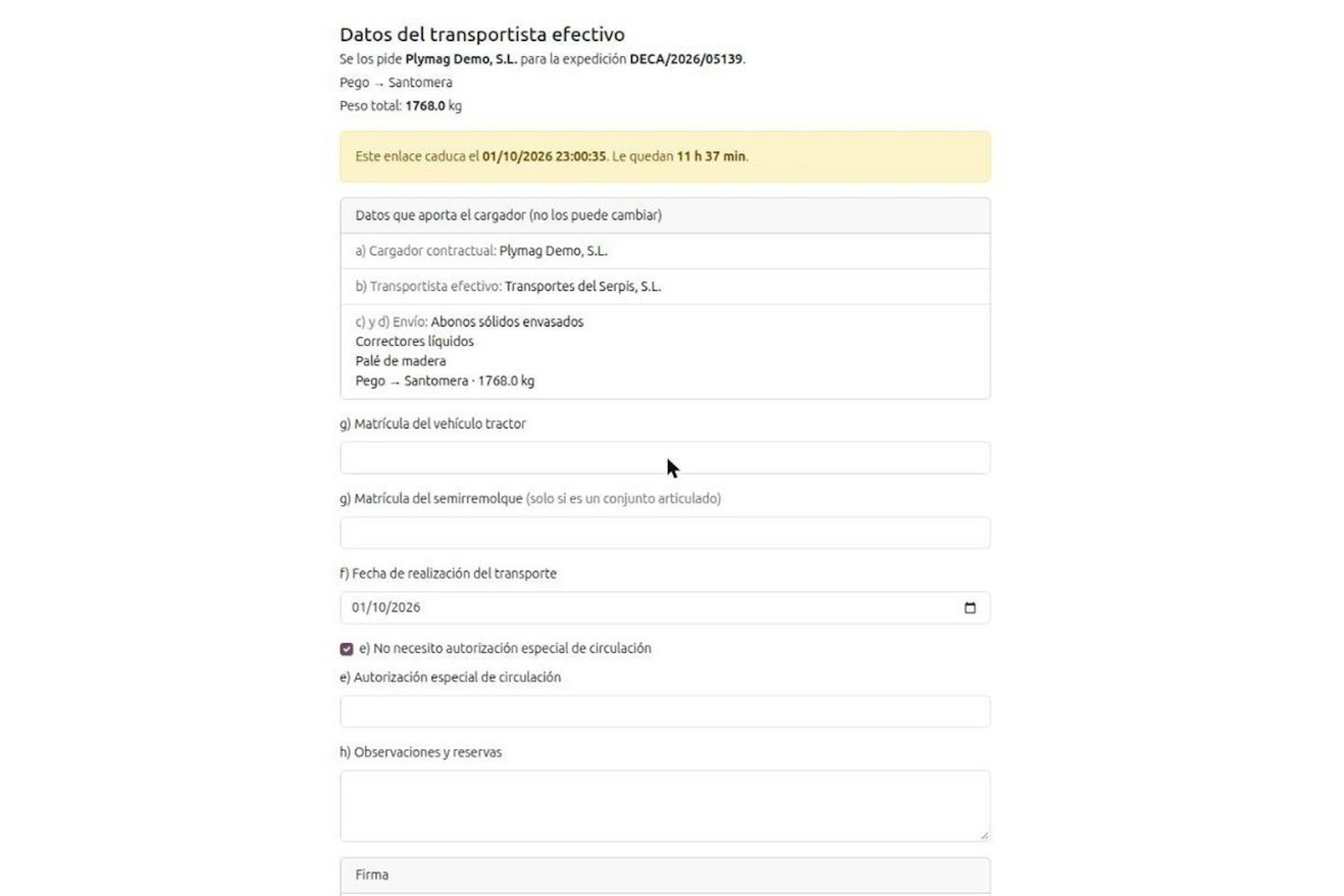
Step 3. The carrier completes the DeCA through a link and a PIN.
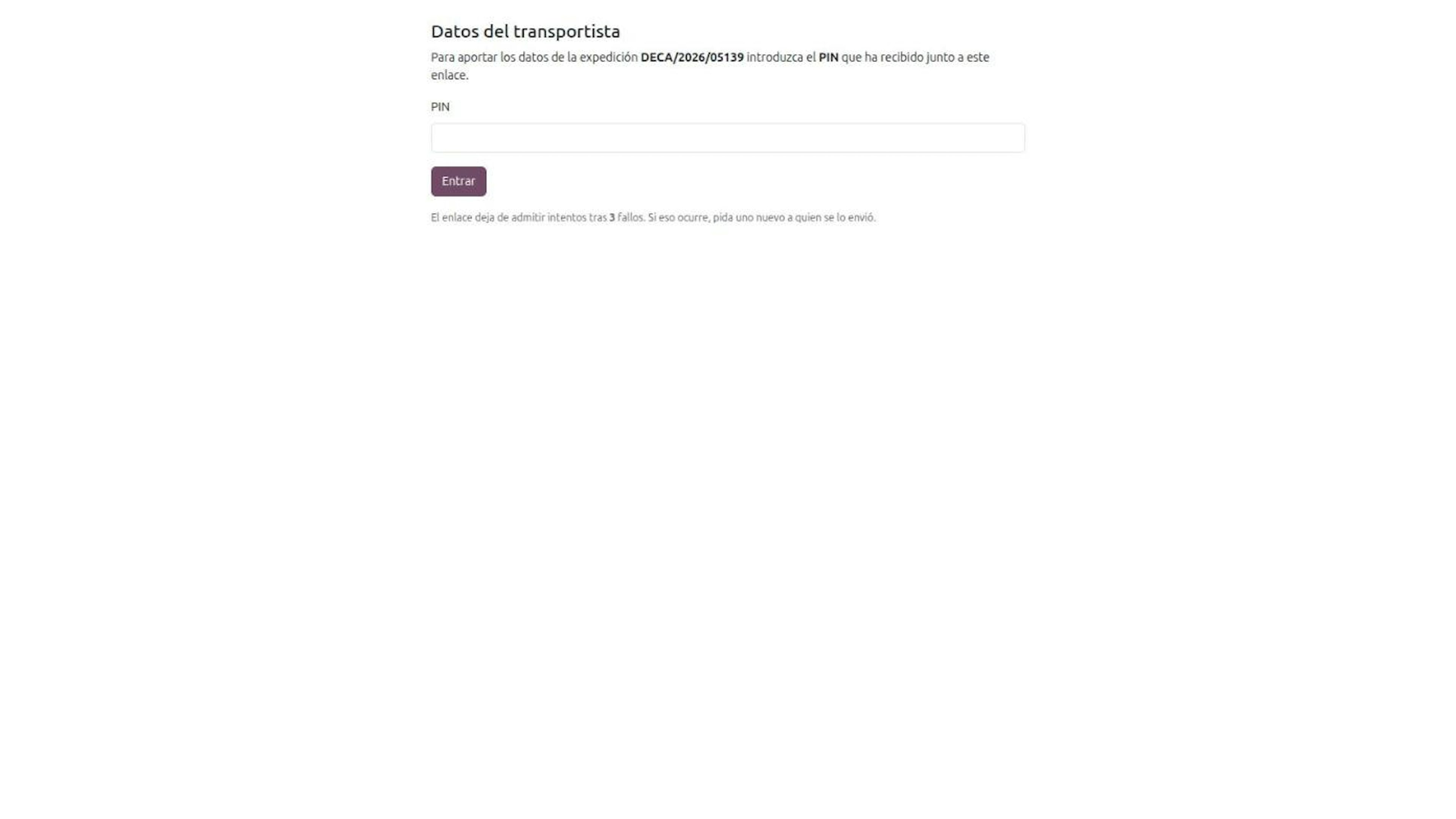
With Request data from carrier, Odoo sends them a capture link by email or SMS. They need no user in your Odoo.
The link expires.
Opening it requires a six-digit PIN, sent in a separate message, with three attempts.
From their phone they enter plates, date and special authorisation if applicable, and sign.
Each new link revokes the previous one.
If the carrier would rather read you the plate over the phone, you type it in yourself.
Step 4. The DeCA PDF carries two QR codes.
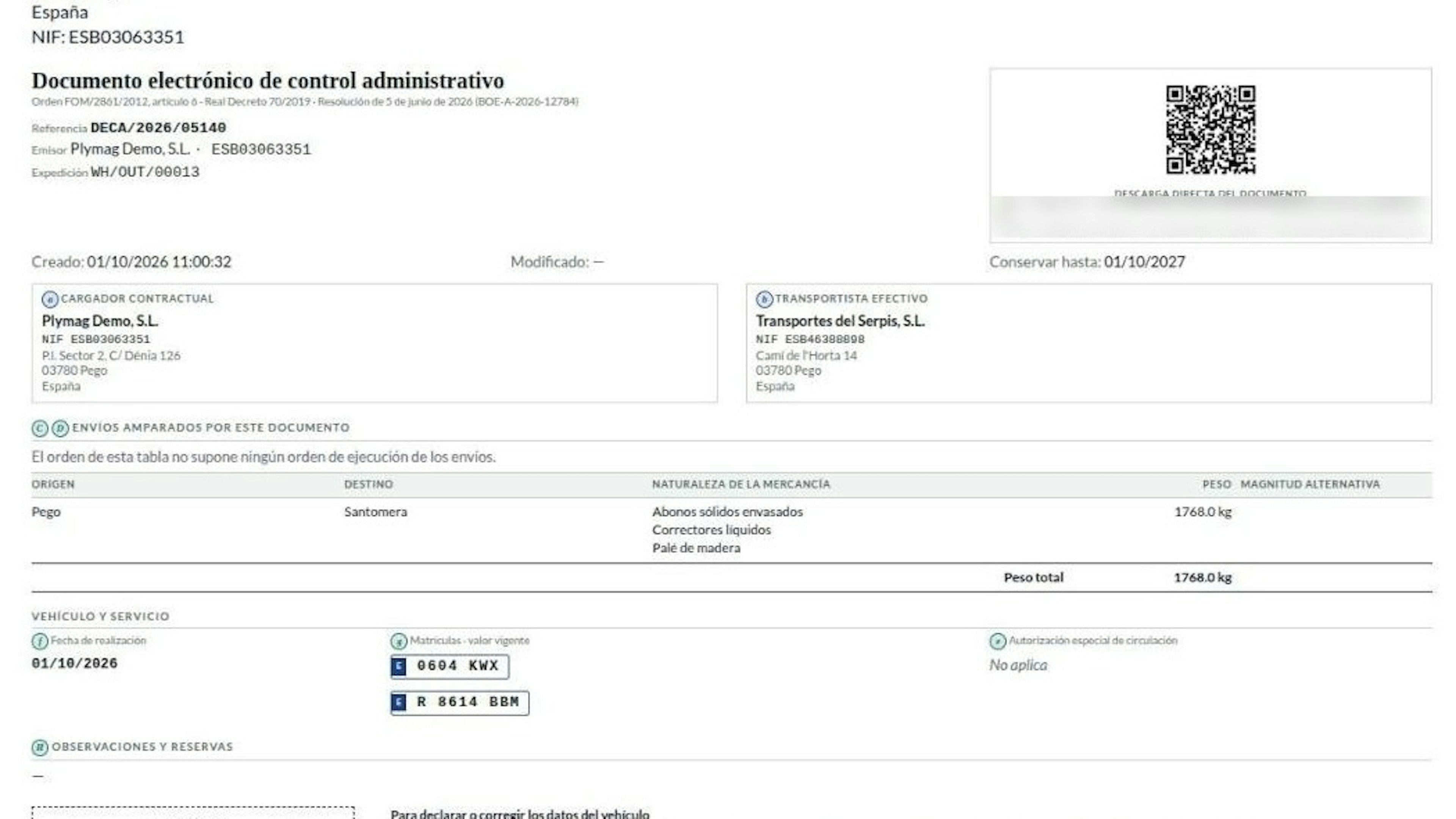
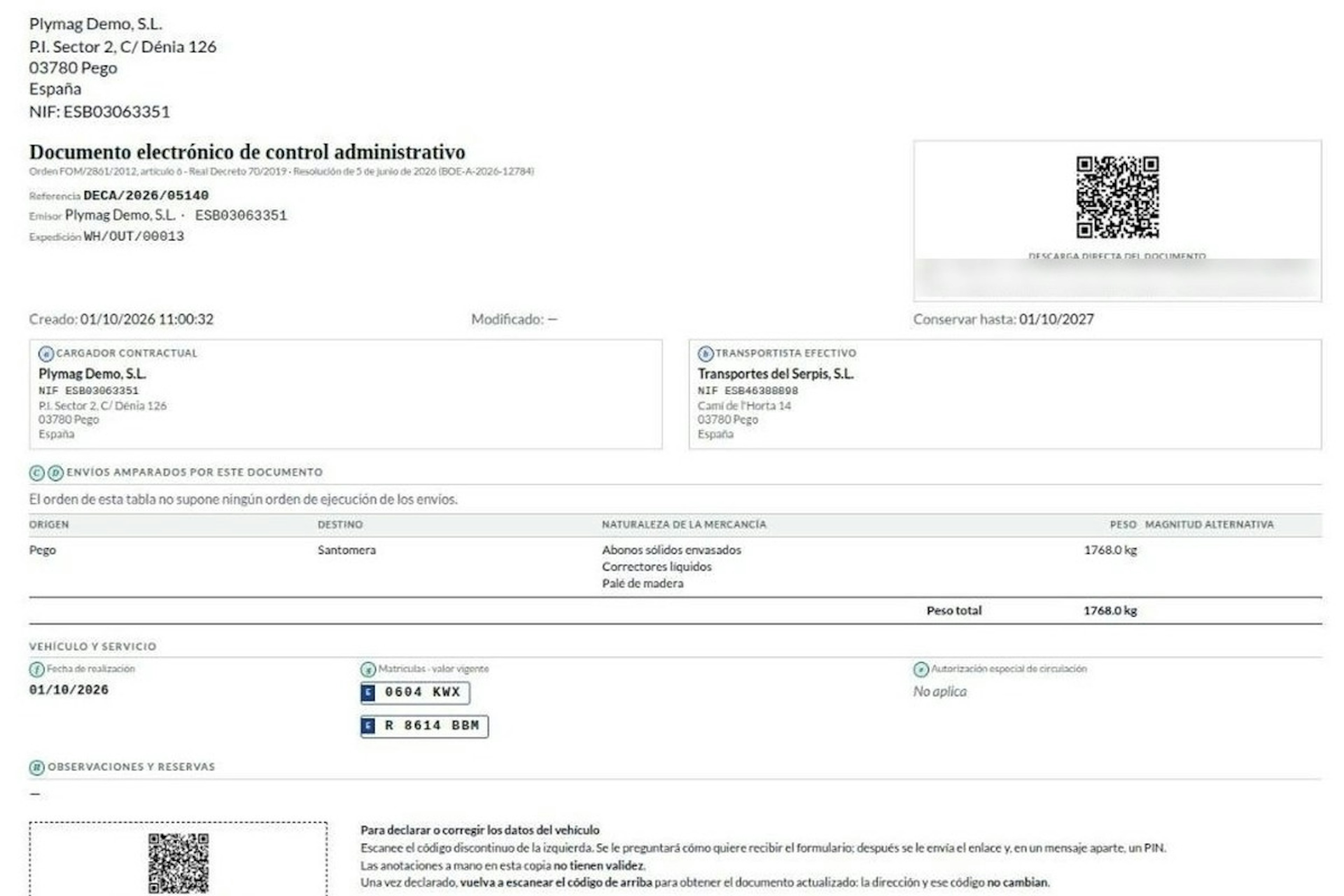
With all eight items in place, the DeCA moves to Issued and Odoo generates the PDF: native, under 5 MB, with sealed dates. It carries two codes:
The verification QR, with the unique
https://URL that downloads the document without credentials.A second QR, with a dashed border and marked as not the official code, to declare or correct the vehicle data.
The copy has to reach the driver before departure. Whether you send it to their phone, on paper or on a screen is up to your own process.
Step 5. A DeCA change on the road does not invalidate what the driver carries.
If there is a breakdown and the vehicle changes, the driver scans the second QR. Odoo does not give access to whoever holds the paper: it sends a new link with a PIN to the carrier's registered channel, and the carrier can only change plates and remarks. Amending keeps the same URL; replacing creates a new document with a new URL, and the previous one is marked as replaced and kept for traceability. We cover it in detail in DeCA changes on the road: QR, secure link and PIN.
Step 6. The DeCA is kept for one year with an immutable history.
Each DeCA shows its Keep until date, one year later. Every change stays in a history that cannot be deleted. Several delivery orders on the same truck can share one DeCA if they have the same shipper and carrier.
What you need configured in Odoo for the DeCA.
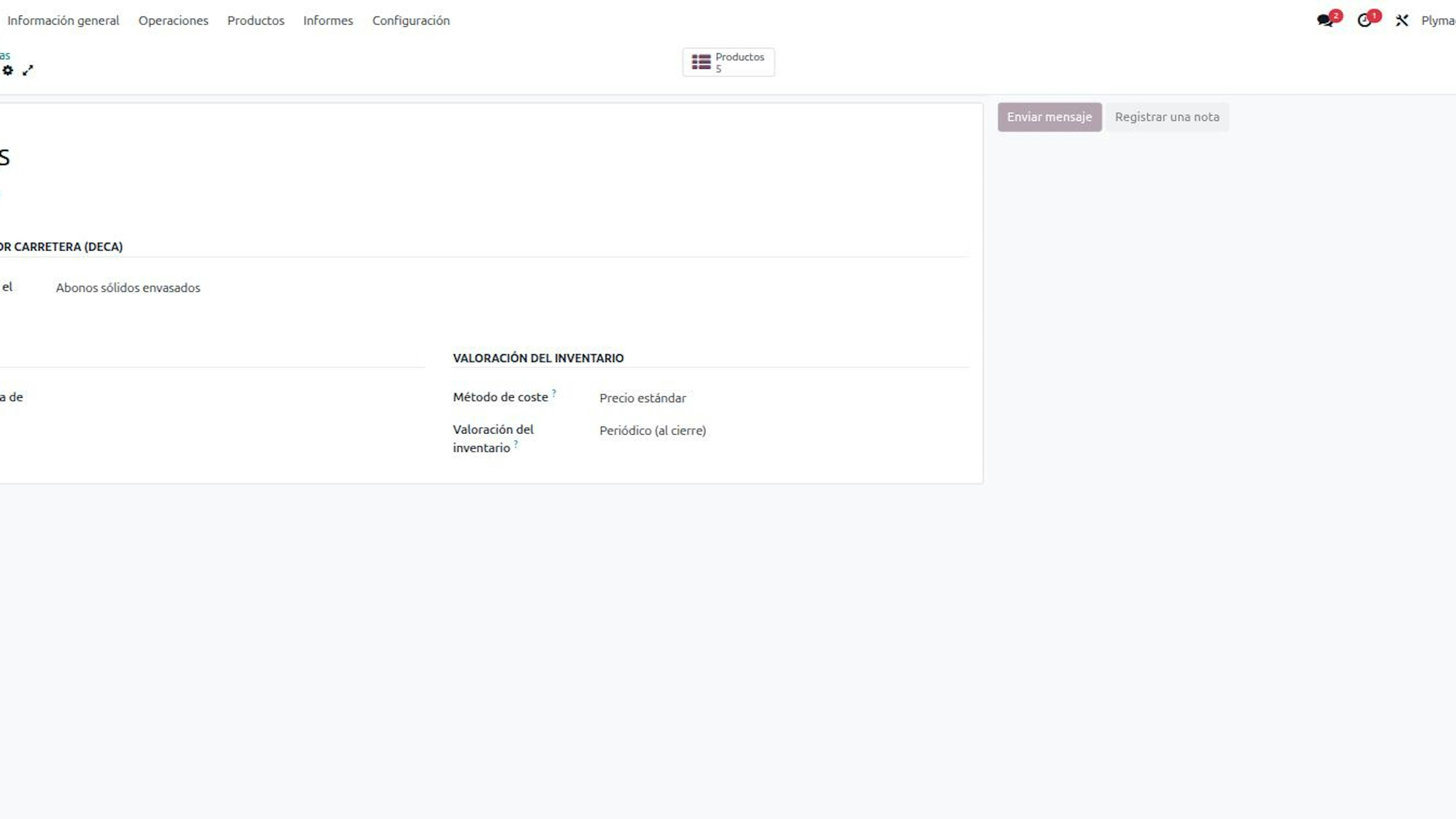
Whether the DeCA comes out right first time depends on your master data:
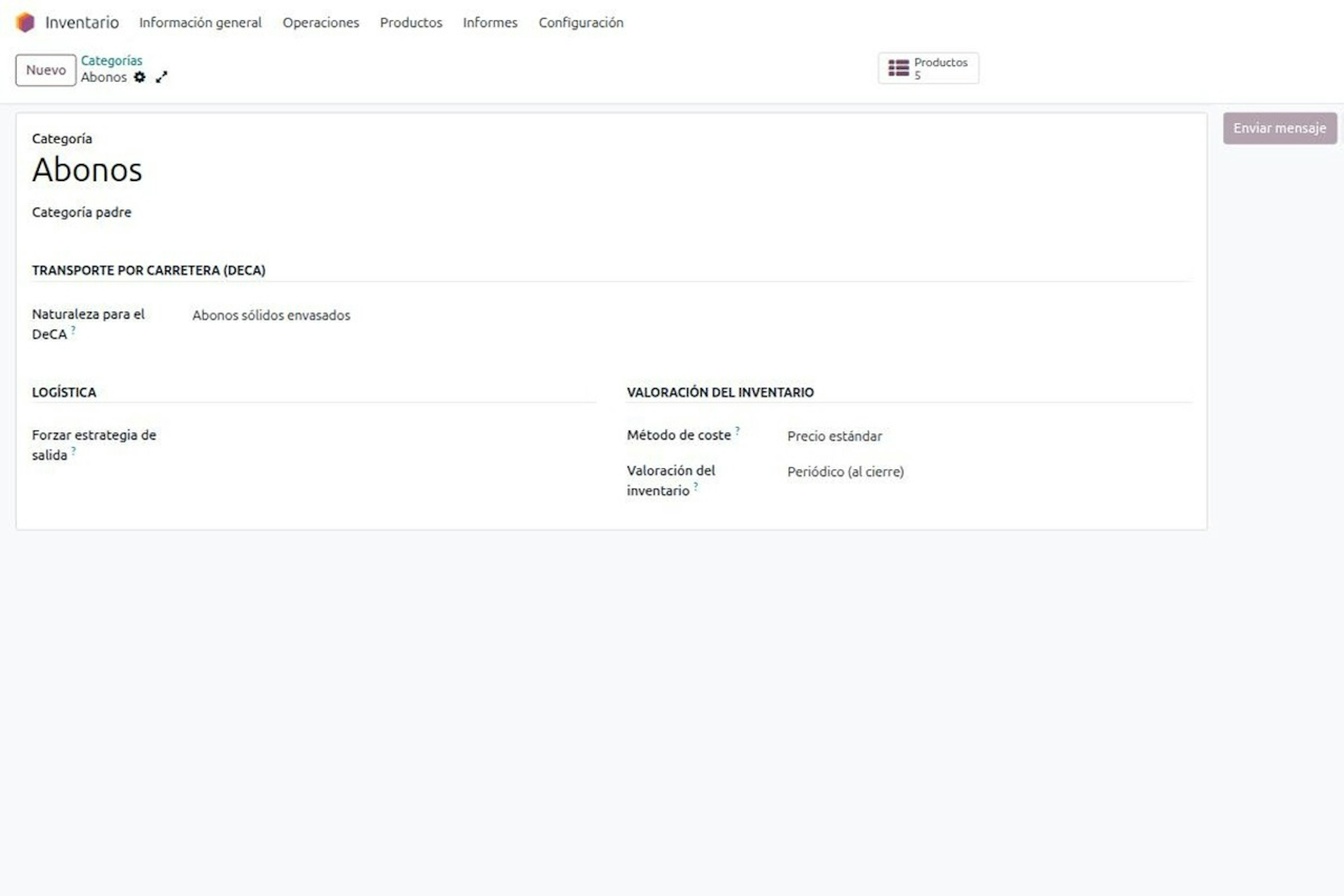
Nature of the goods on the product category. A "Fertilisers" category with the nature "Packaged solid fertilisers" covers all its references; a product that differs is flagged as the exception.
Carrier on the shipping method. It becomes the actual carrier on the DeCA.
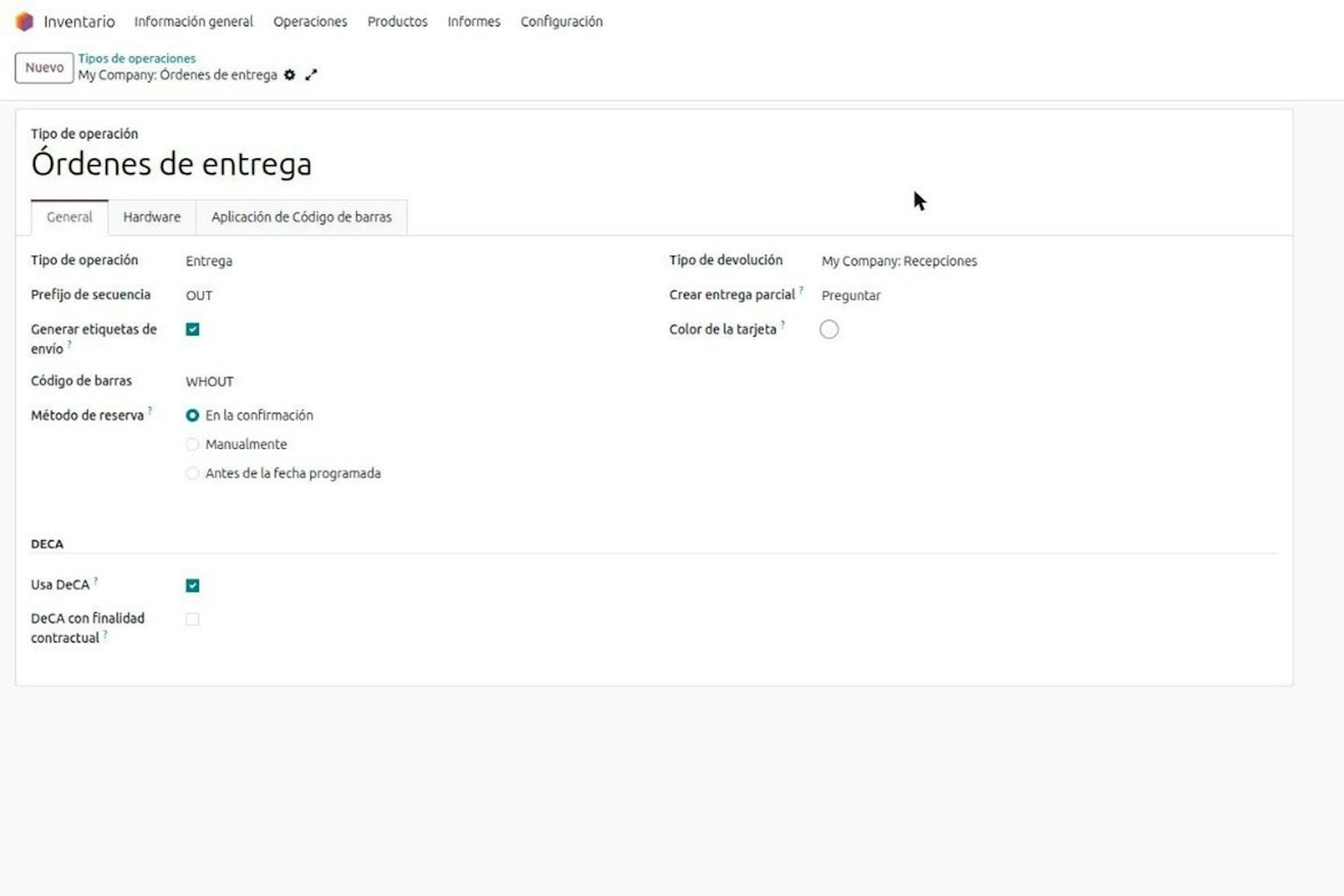
"Uses DeCA" on the operation types. It only shows or hides the fields.
Access rights for DeCA users and managers.
Odoo served over HTTPS with TLS 1.2 or higher. Whoever deploys your Odoo guarantees this; if not, the DeCA form warns you.
What falls outside the DeCA.
International transport: documented with CMR or eCMR.
Complementary private transport (transporte privado complementario): own goods, own truck, own driver.
A few packages: article 2.1 d) exempts loads one person can easily handle, with no threshold set. Your business decides and you mark the delivery order as exempt.
A return is public transport and needs its own DeCA. And the penalties under the LOTT (Spain's Land Transport Act, articles 140 to 143) reach both shipper and carrier.
Frequently asked questions about the DeCA in Odoo.
We run Odoo and used to carry the control document on paper. What changes with the DeCA?
The format changes, not the content. The Electronic Administrative Control Document (DeCA) is the document of Order FOM/2861/2012, but mandatorily digital from 5 October 2026. The eight article 6 items stay the same. The Resolution of 5 June 2026 requires a native PDF of 5 MB at most, with a QR pointing to a unique https:// URL over TLS 1.2 or higher, and one year of retention. A scan of the old paper does not comply. In Odoo, the practical change is that the document is no longer filled in by hand: it is issued from the delivery order with the shipment's data. It only covers transport with origin and destination in Spain; international loads still use CMR or eCMR.
We are a distributor, run our warehouse in Odoo and subcontract all transport. Do we have to issue the DeCA?
Yes, the DeCA binds you, and the document will normally come from your company. Order FOM/2861/2012 binds the contractual shipper, the party that pays a third party to carry the goods, trucks or not, and the actual carrier, but it does not say who generates the Electronic Administrative Control Document (DeCA). The usual practice is for the shipper to issue it: it holds four of the eight items and, under article 7.1, if it proves issuance it does not answer for the copy being on board. The actual carrier supplies the special authorisation, date and plates (items e, f and g) and carries the copy. In Odoo you mark the delivery order as contractual shipper, and Odoo will not validate the departure without the DeCA. Penalties under the LOTT, articles 140 to 143, reach both parties. The limit is complementary private transport: own goods, truck and driver carry no DeCA.
Does Odoo include the DeCA out of the box, or do we need to add something?
Standard Odoo does not include the Electronic Administrative Control Document (DeCA). At Dynapps we add it as a record of its own in Odoo that hangs off the delivery order: it takes the shipper, the carrier from the shipping method, origin, destination, nature and weight, and generates the PDF with its verification QR. On top of that comes the carrier capture link, with a six-digit PIN, by email or SMS. It is not an external app and is not sold outside Odoo. What it does not do is decide for you which shipments are exempt: that depends on your load and is set delivery order by delivery order. Nor does it replace the CMR for international transport.
Our carriers have no user in our Odoo. How do they enter the plate on the DeCA?
Through a capture link. From the Electronic Administrative Control Document (DeCA) in Odoo you click Request data from carrier and they receive a link by email or SMS. Opening it takes a six-digit PIN, sent in a separate message, with three attempts. From their phone they enter tractor and semi-trailer plates, date and special authorisation if applicable, and sign. The link expires, and each new link revokes the previous one, so no access is left open. If they would rather call you, you type the data into the delivery order. The carrier cannot touch the shipper's data: they only answer for items e, f and g, plus remarks.
What happens if the truck breaks down on the road and the tractor changes? Do we need a new DeCA?
Not necessarily. The Electronic Administrative Control Document (DeCA) PDF that Odoo generates carries a second QR to declare or correct the vehicle data. When it is scanned, Odoo does not give access to whoever holds the paper: it sends a new link with a PIN to the actual carrier's registered channel, and the carrier can only change plates and remarks. If you amend the DeCA, the URL stays the same and the printed QR leads to the current version; if you replace it, a new document with a new URL is created and the previous one is marked as replaced, kept for traceability. Every change stays in a history that cannot be deleted. Handwritten notes on the printed copy have no validity.
What do we need to prepare in Odoo before we start issuing the DeCA?
Clean master data. The Electronic Administrative Control Document (DeCA) comes out right first time when the nature of the goods is set on each product category, when each shipping method names the actual carrier and when the team knows how to set the role on the delivery order. In our Odoo projects this is closed before go-live, because a DeCA issued late is no longer compliance, only a record. Odoo must also be served over HTTPS with TLS 1.2 or higher, as the Resolution of 5 June 2026 requires. Whoever deploys your Odoo guarantees this; the form warns you if it is not met. If you do not have Odoo yet, this is prepared as part of the implementation.
We sell fertiliser on pallets with many references. Does each product have to appear on the DeCA?
No. The nature on the Electronic Administrative Control Document (DeCA), item d of article 6 of Order FOM/2861/2012, is the class of goods and not the commercial reference. A pallet with twelve references of packaged fertiliser is a single nature. In Odoo it is declared once on the product category, for example "Packaged solid fertilisers", and all its references inherit it; an item that differs is flagged on its own form. The PDF lists the natures with the total weight, not every line of the delivery order. Before you start, it pays to review your Odoo category tree with someone from logistics: it is done once and prevents most errors.
Do parcel shipments or loads of a few packages also need a DeCA?
Usually not. Article 2.1 d) of Order FOM/2861/2012 exempts from the Electronic Administrative Control Document (DeCA) the carriage of a small number of packages one person can easily handle, which covers much of courier traffic. The challenge is that the rule sets no threshold: neither packages nor weight. Your business decides and should put it in writing. In Odoo that decision is made delivery order by delivery order with the exempt role, because a warehouse can ship a full truck in the morning and two boxes in the afternoon. International transport, with CMR or eCMR, and complementary private transport also fall outside.
How long must we keep the DeCA, and what if we run several companies in the same Odoo?
At least one year. The Resolution of 5 June 2026 requires both the contractual shipper and the actual carrier to keep the Electronic Administrative Control Document (DeCA) for that period, and Odoo shows a Keep until date on each document. Every amendment leaves a history that cannot be deleted, so you can always show what the document said at any moment. If your group has several companies in the same Odoo, each company only sees its own DeCAs. Note that goods belonging to another company in the group count as third-party goods, so if one company carries for another there may be a DeCA between them. Returns also need their own document.
Book a demo of the DeCA in Odoo.
If you already run Odoo or are about to implement it, we will show you the full flow inside Odoo on a real delivery order: the DeCA role, the link with PIN, the PDF with its two QR codes and the change on the road. We are an Odoo Gold Partner with 280+ Odoo experts and 150+ customer references in Spain, and we stay with you from master data to your first departure with a DeCA. Book a demo of the DeCA in Odoo with our team in Spain
More posts like this
8-minute read
Who must issue the DeCA: both parties, and in Odoo you decide it on each delivery order.
The DeCA binds both the contractual shipper and the actual carrier, even if you own no trucks. Five questions to find out which one you are and how it shows on each Odoo delivery order.
8-minute read
DeCA in Odoo for distribution companies: comply even without trucks.
If you distribute with Odoo and contract the transport, the DeCA binds you even if you own no truck, and you will usually be the one issuing it. What data you supply, why it is already on your delivery order and what daily work looks like.
8-minute read
DeCA for transport companies with Odoo: you supply your data by link and issue it when you subcontract.
As the actual carrier, the DeCA binds you, but you will usually supply the special authorisation, date and plates through the link your client's Odoo sends you. When you subcontract, you will normally issue it from your own Odoo.
8-minute read
How the DeCA works in Odoo when the truck changes on the road: QR, secure link and PIN.
A breakdown, a different semi-trailer, a reservation about the load: this is how the DeCA is amended in Odoo during transport, with two QR codes, a link only the carrier receives and a six-digit PIN.