What is Odoo Runbot and how do you use it?

What is Odoo Runbot and what is it used for?
If you're passionate about programming on systems like Odoo, you need to know Odoo RunBot. This tool allows companies and developers to experiment in real time with the latest features and updates of the most comprehensive ERP system on the market. It also makes it easier to test new modules and developments without compromising real data, providing a secure environment for high-quality demonstrations and prototypes.
At Dynapps, Odoo Gold Partner, we understand that every business is unique and requires customized solutions. That’s why, in this article, we’ll show you what Odoo Runbot, how to use it, its advantages and limitations, and everything you can do with it to evaluate this innovative ERP technology.
Odoo Runbot is an innovative web-based environment designed to give developers, consultants, and technical users the opportunity to explore the latest Odoo features. It allows users to set up temporary instances of the ERP, making it easy to run tests, conduct demonstrations, and validate new developments without having to install anything on local servers.
Real-time testing environments
One of the Key features of Odoo Runbot is its ability to provide real-time testing environments. This means that the moment an instance is requested, the environment is loaded with the modules and configurations needed to interact with the latest ERP updates.
Users can immediately experiment with new features, run simulations of business processes, and identify potential inconsistencies. This is useful during live demonstrations for clients or for validating custom developments, allowing ideas to be iterated on and optimized quickly and safely.
Difference between Odoo Runbot and Odoo.sh
Although both environments are designed for development and testing within the Odoo ecosystem, there are Key differences between Odoo Runbot and Odoo.sh. Odoo Runbot is primarily designed for quick testing, demonstrations, and experimentation in temporary environments. Its strength lies in its immediacy and agility in displaying the latest changes to the ERP.
Designed for long-term development, continuous integration, and production deployment, this makes it ideal for projects that require greater control, data persistence, and extensive customization.
You might be interested to know: What is Odoo?
How do I access Odoo Runbot step by step?
Accessing Odoo Runbot is easy and does not require advanced technical knowledge. You can test it in isolation to verify that everything works as described in the tool's documentation.
How to Choose the Right Odoo Version (Community or Enterprise)
Now it's time to select the version of Odoo you want to try. There are two main options:
Community: This is the free, open-source version that offers great flexibility for customizing and adapting the system to specific business processes.
Enterprise: It includes additional features, premium support, and advanced capabilities that are ideal for large companies with more complex requirements.
Choosing the right version will depend on the size and specific needs of your business. In the Odoo Runbot environment, you can switch between these versions and directly experience the differences in features, performance, and ease of use.
Official Odoo Runbot URL
The first step is to go to the Official Odoo Runbot URL, which can be found on the Odoo website. By following this link, you’ll always have access to the latest version of the tests and the most recent code updates. When you visit the page, Sign in or sign up on the platform If you don't have an account yet, go to the open source section and select Odoo Runbot. You'll find a clean, intuitive interface designed to make it easy to navigate and select testing options based on your needs.
How to set up an environment and test features without installing anything
One of the great Benefits of Odoo Runbot is the ability to set up a test environment in just a few clicks. The process involves the following steps:
Go to the official URL and select the version you want (Community or Enterprise).
Click the button "Connect" under the "runbot" or "all" column (there are two access points: frontend and backend). An Odoo window will open with a preconfigured database.
Configure the basic settings, such as the instance name and some initial settings.
In a matter of seconds, a functional environment will be set up where you can interact with the system's features.
Browse the Odoo modules, create records, and run tests without worrying—everything resets automatically in a few hours.
This methodology eliminates the need for on-premises installation or server configuration. This allows any user to explore and test new modules and developments without compromising real data.

Who can use Odoo Runbot?
Odoo Runbot is designed to be used by a wide range of professional profiles. Thanks to its focus on accessibility and ease of use, you can explore its features in just a few steps.
Technical users, consultants, and developers
The tool is designed to adapt to the needs of different types of users. For example, Developers can use Runbot to validate new modules, test integrations, and experiment with custom code without affecting production environments. Consultants have the opportunity to conduct live demonstrations and build prototypes that demonstrate Odoo's potential for optimizing business processes.
Technical users can perform functional tests to ensure that the platform meets operational and strategic expectations. This flexibility allows anyone to familiarize themselves with the software without having to modify the installed programs.
Do I need an account or to register to access this?
No. One of the biggest Benefits of Odoo Runbot The thing is, you don't need to register, pay, or install anything. Just log in, choose a version, and start using it. However, in some cases, to access advanced features or achieve deeper integration with other Odoo services, you may need to link your account to a formal account on the platform.
Key features you can try in Odoo Runbot
Odoo Runbot isn't just a demo tool; it's a fully featured environment that allows you to thoroughly evaluate the ERP's performance and capabilities. That's why you can choose the Digital Transformation with Odoo.
Modules installed by default
When you launch an instance on Runbot, you'll find a number of modules installed by default. These cover areas of business management, such as sales, inventory, purchasing, accounting, human resources, among others. This setup allows users to quickly familiarize themselves with the environment and assess the full range of features Odoo offers. It also makes it easier to conduct comparisons and tests, helping to identify which areas of the ERP best meet the specific needs of each business.
Create temporary databases
Another one of the features you can test in Odoo Runbot is the ability to create temporary databases. From this environment, users can create new accounts, configure products, generate invoices and quotes, or simulate entire sales or purchasing workflows. By creating a temporary database, users can perform tests and make configurations without risk, since any changes will be lost when they log out.
Test custom developments without affecting production environments
One of the biggest challenges in any ERP implementation is ensuring that changes do not affect the operation of production systems. Odoo Runbot allows you to test custom developments in an environment identical to the production environment. This means that any errors or necessary adjustments can be identified and corrected before proceeding with a final implementation.
It allows you to see how code changes affect new versions and even compare behavior across versions. This feature is essential for those looking to innovate without disrupting daily operations.
Benefits and advantages of using Odoo Runbot
Like any tool, Odoo Runbot offers several advantages significant, but there are certain limitations. Understanding both aspects is essential to making the most of their potential and knowing when it’s time to consider alternative solutions.
Ideal for demonstrations and quick testing
Odoo Runbot is perfect for giving live demos to clients, compare the features of Odoo Enterprise and Odoo Community, and assess how Odoo works for your business before implementing it. The speed at which instances load and the ease of setting up temporary environments allow users to test ideas and innovations in a matter of seconds.
Limitations on performance, duration, and persistence
The first step is to go to the Official Odoo Runbot URL, which can be found on the Odoo website. By clicking this link, you’ll always have access to the latest version of the tests and the most recent code updates. When you visit the page, Sign in or sign up on the platform If you don't have an account yet, go to the open source section and select Odoo Runbot. You'll find a clean, intuitive interface designed to make it easy to navigate and select testing options based on your needs.
Alternatives if you need more control (Odoo.sh, (in-house servers)
For companies or projects that require greater control over the development environment, there are other alternatives. One notable option is Odoo.sh, which enables continuous integration, custom configuration, and deployment in a managed and scalable environment. It is ideal for long-term development projects that require a robust infrastructure and data persistence.
Another option is Deploy Odoo on your own servers, which offers the highest level of customization and control, although it requires a greater investment in infrastructure and maintenance. These options, while more demanding in terms of resources and management, ensure consistent performance tailored to the needs of each business.
To learn more about how to unlock the full potential of this ERP system, sign up for training with the Odoo course. Talk to the experts at Dynapps to learn how to use this tool to take your business to the next level.
Discover what Odoo can do for your business.
An initial meeting to see if we're a good fit, followed by a demonstration tailored to your processes.
More posts like this

4-minute read
Odoo and PHP: Why Critical PHP Vulnerabilities Don't Affect Your Odoo.
Odoo does not run on PHP. The two critical vulnerabilities that PHP fixed on October 21, 2026, put millions of websites at risk—but not your Odoo. We'll explain what happened and what you need to check.

5 min read
AI in Odoo for SMEs: what already works, with real cases.
What AI can do in your Odoo today, the Prima Protección case, the two ways to connect it (Claude via MCP and the Odoo 20 agents) and how to start in your company.
7 min read
Connecting Claude to Odoo: the MCP connector we use every day.
What MCP is, how we connect Claude to your Odoo with our own connector, what your team can do with it from day one, and how it fits with the MCP in Odoo 20.
12 min read
What's new in AI in Odoo 20: agents that act and ask permission.
A summary of the AI talk at Odoo Experience 2026: the Odoo AI agent, app-specific agents, self-update, IAP credits and Odoo as an MCP server, plus what we found in the version 20 code.

Odoo Pricing in Spain
Odoo Pricing in Spain
Licenses, implementation, and how to finance it.

Odoo Partners Near You: Valencia · Murcia · Alicante · Barcelona · Madrid
Odoo Partners Near You: Valencia · Murcia · Alicante · Barcelona · Madrid
Odoo Implementation, Consulting, and Support for Companies in Spain
8-minute read
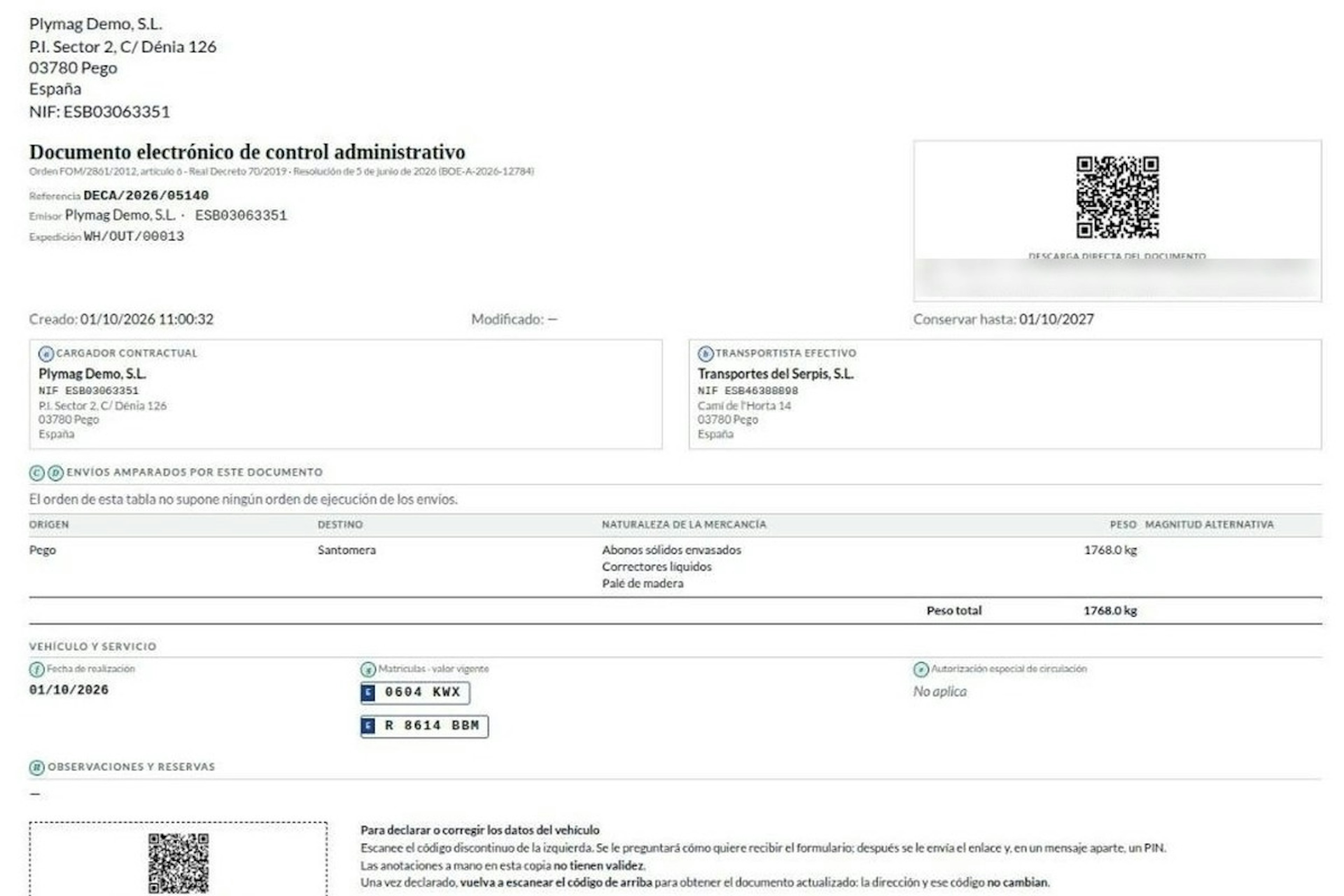
How the DeCA works in Odoo when the truck changes on the road: QR, secure link and PIN.
A breakdown, a different semi-trailer, a reservation about the load: this is how the DeCA is amended in Odoo during transport, with two QR codes, a link only the carrier receives and a six-digit PIN.
8-minute read
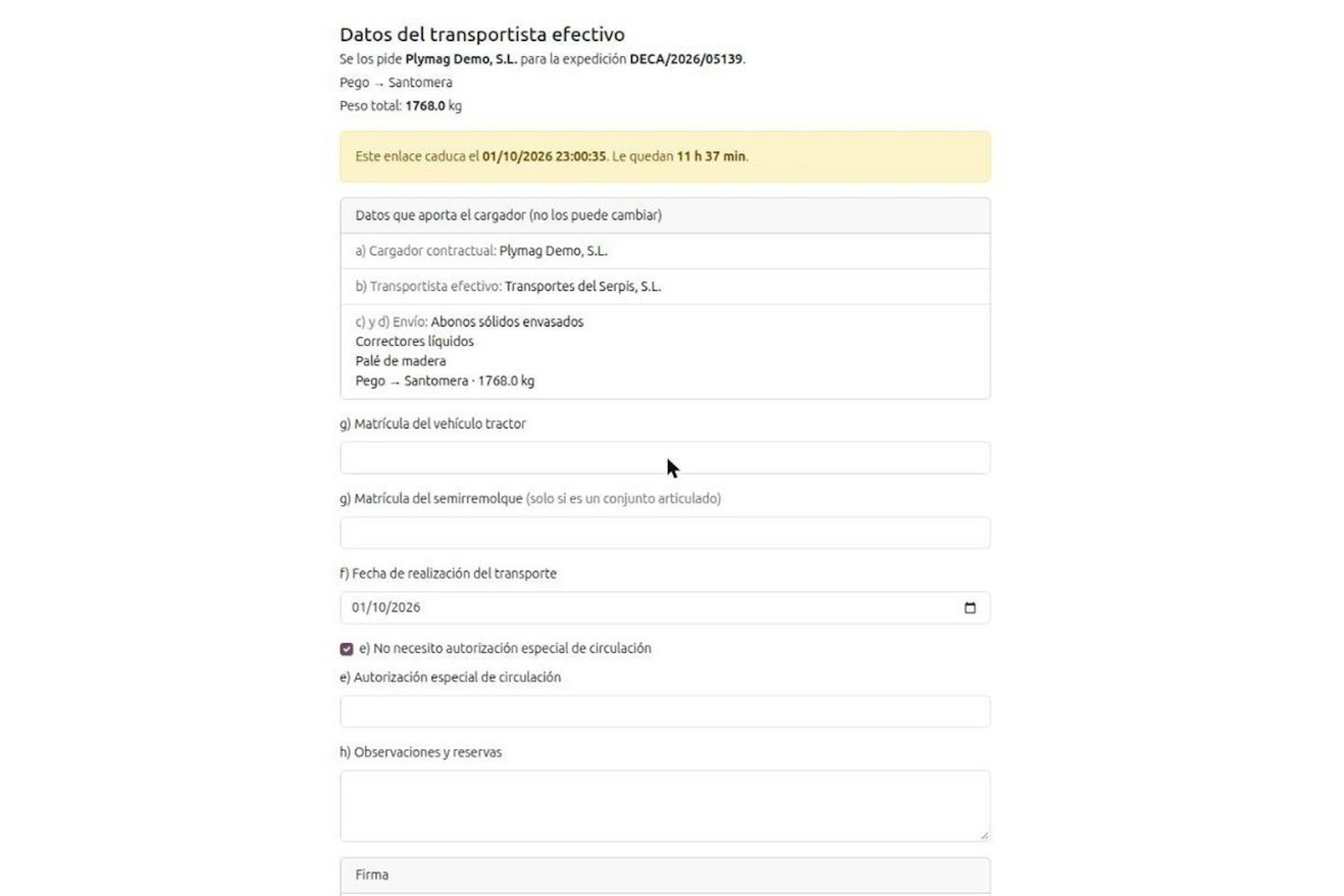
DeCA for transport companies with Odoo: you supply your data by link and issue it when you subcontract.
As the actual carrier, the DeCA binds you, but you will usually supply the special authorisation, date and plates through the link your client's Odoo sends you. When you subcontract, you will normally issue it from your own Odoo.
13-minute read
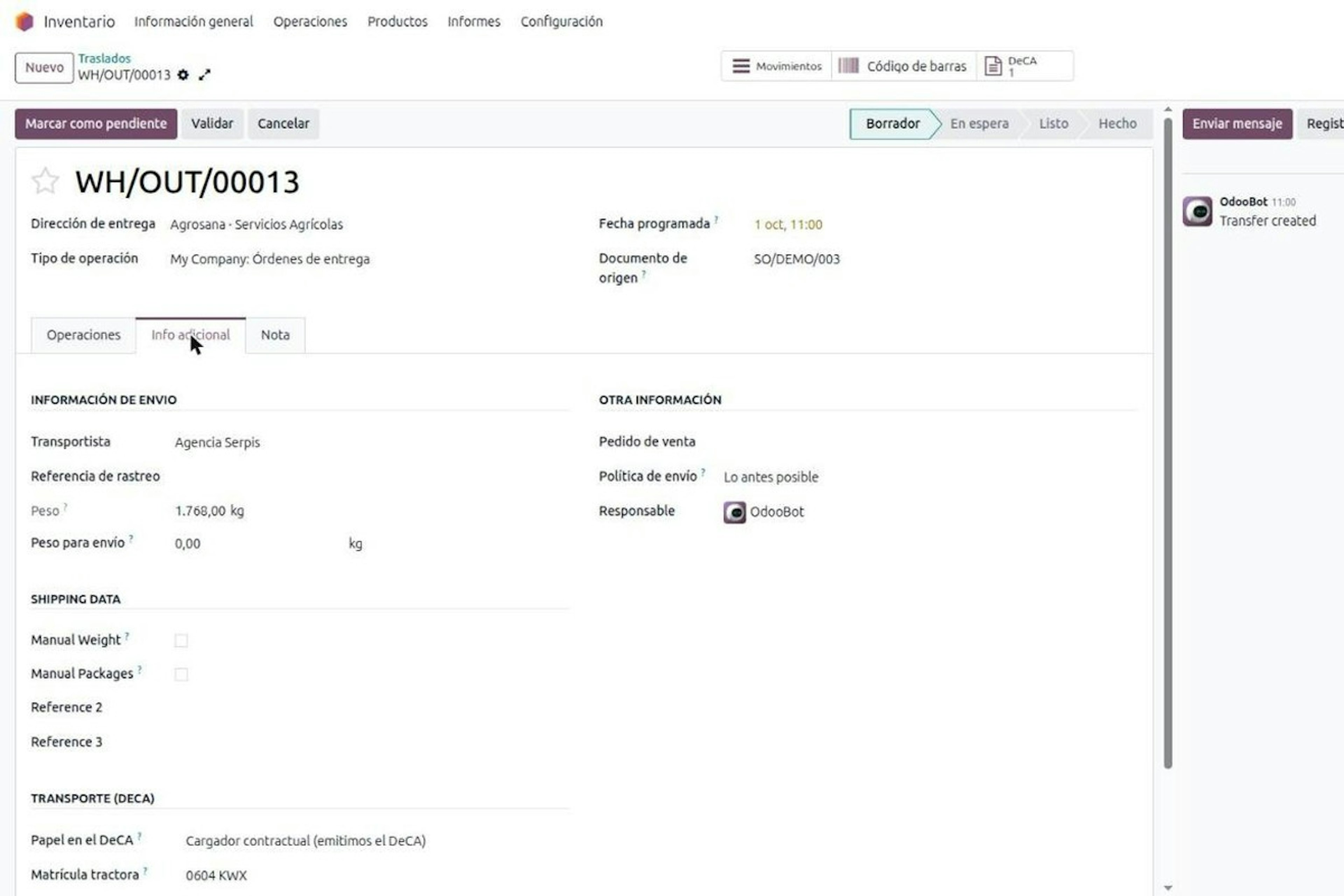
DeCA in Odoo: the transport control document, issued from the delivery order.
The DeCA is mandatory from 5 October 2026. If you run Odoo, you issue it from the delivery order with no separate tool, and the carrier adds the plate from their phone.
8-minute read
DeCA in Odoo for distribution companies: comply even without trucks.
If you distribute with Odoo and contract the transport, the DeCA binds you even if you own no truck, and you will usually be the one issuing it. What data you supply, why it is already on your delivery order and what daily work looks like.